
Undergraduate Certificate in Mastering Screencast Software Tools
Earn an Undergraduate Certificate and master screencast software tools for effective visual content creation and digital communication.
Undergraduate Certificate in Mastering Screencast Software Tools
Programme Overview
This Undergraduate Certificate in Mastering Screencast Software Tools is designed for students and professionals seeking to enhance their digital communication and presentation skills through the use of screencasting software. The programme equips learners with the ability to create high-quality, engaging video content that effectively communicates complex ideas and processes. Suitable for educators, trainers, content creators, and anyone looking to improve their digital presentation skills, the course is structured to cater to a wide range of learning needs.
Key skills and knowledge developed in this programme include the proficient use of popular screencasting tools such as Camtasia, ScreenFlow, and Loom, as well as advanced video editing techniques, audio recording, and the integration of multimedia elements. Learners will also gain a deep understanding of content creation strategies, project management, and the ethical considerations surrounding digital media production. This comprehensive skill set is essential for creating impactful online presentations, tutorials, and educational content.
The programme has a significant career impact by providing learners with the ability to enhance their digital portfolios, improve their online presence, and develop marketable skills in digital content creation. Graduates can pursue careers as e-learning developers, online educators, digital marketers, or content creators across various industries. The demand for professionals skilled in screencasting and digital content creation continues to grow, making this programme a valuable investment for career advancement and personal development.
What You'll Learn
Master the art of creating compelling and informative screencasts with the Undergraduate Certificate in Mastering Screencast Software Tools. Tailored for students and professionals, this program equips you with the skills to produce high-quality video tutorials, presentations, and demonstrations. Key topics include screen recording techniques, editing software proficiency, narrative storytelling, and effective visual communication. You'll learn to utilize tools such as Camtasia, OBS Studio, and Loom, mastering features like annotations, voiceovers, and visual effects.
This certificate not only enhances your technical ability but also boosts your ability to engage and educate audiences. Graduates can apply these skills in various fields, from education and e-learning to product demonstrations, software training, and content creation. Careers in instructional design, technical communication, and multimedia development become more accessible, offering opportunities to create valuable, interactive content that drives learning and engagement.
By the end of this program, you will be well-prepared to create engaging, polished screencasts that communicate complex ideas effectively. Whether you're a student looking to enhance your academic projects or a professional aiming to expand your skill set, this certificate provides the foundational knowledge and practical skills you need to succeed in today’s digital landscape.
Programme Highlights
Industry-Aligned Curriculum
Developed with industry leaders for job-ready skills
Globally Recognised Certificate
Recognised by employers across 180+ countries
Flexible Online Learning
Study at your own pace with lifetime access
Instant Access
Start learning immediately, no application process
Constantly Updated Content
Latest industry trends and best practices
Career Advancement
87% report measurable career progression within 6 months
Topics Covered
- Introduction to Screencasting: Introduces the concept of screencasting and its applications.: Software Fundamentals: Explores the basics of common screencasting software.
- Planning and Scripting: Teaches how to plan and script effective screencasts.: Recording Techniques: Covers various recording methods and best practices.
- Editing and Post-Production: Guides through editing tools and techniques.: Sharing and Distribution: Discusses methods and strategies for sharing screencasts.
What You Get When You Enroll
Key Facts
For working professionals, students
No prior experience required
Proficient in popular screencast tools
Create high-quality tutorials and demos
Enhance digital communication skills
Ready to Advance Your Career?
Join thousands of professionals who have transformed their careers with LSBR UK
Why This Course
Enhancing Digital Skills: Acquiring a certificate in mastering screencast software tools can significantly enhance a professional’s digital skills. These tools are essential for creating clear, engaging, and informative video tutorials and demonstrations, which are highly valued in the tech industry. For instance, professionals in IT support can use these skills to create step-by-step walkthroughs for troubleshooting common issues, thereby improving customer service.
Career Advancement: Employers often seek candidates who can demonstrate proficiency in the latest digital technologies. A certificate in screencast software tools can be a distinguishing factor in a resume, making candidates more attractive to potential employers. For example, a marketing professional with these skills can create compelling product demonstrations, helping to drive sales and engage with a broader audience.
Career Flexibility: The ability to create effective screencasts is a versatile skill that can be applied across various industries. Whether it's training employees, creating online courses, or developing marketing content, these tools can transform how information is conveyed and received. For instance, a business analyst can use screencasts to explain complex processes visually, making the information more accessible to stakeholders.
Professional Networking: Many online platforms and communities dedicated to screencast creation offer opportunities for professionals to network with peers, share their work, and gain recognition. Obtaining a certificate can open doors to these communities, providing a valuable platform for career growth and collaboration.
3-4 Weeks
Study at your own pace
Course Brochure
Download our comprehensive course brochure with all details
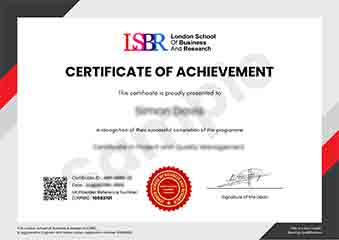
Sample Certificate
Preview the certificate you'll receive upon successful completion of this program.
Get Free Course Info
Receive detailed course information, curriculum breakdown, and career outcomes straight to your inbox.
Employer Sponsored?
Many employers cover professional development costs. Request a corporate invoice and we'll handle the rest. Bulk enrollment discounts available for teams of 3+.
Your Path to Certification
Four simple steps to your professionally recognised qualification
Enroll & Get Instant Access
Complete your enrollment and access course materials immediately
Study at Your Own Pace
Work through the modules on your schedule, from anywhere in the world
Complete Assessments
Demonstrate your knowledge through practical, real-world assessments
Receive Your Certificate
Get your official LSBR UK certificate, recognised across 180+ countries
Join Thousands Who Transformed Their Careers
Our graduates consistently report measurable career growth and professional advancement after completing their programmes.
What People Say About Us
Hear from our students about their experience with the Undergraduate Certificate in Mastering Screencast Software Tools at LSBR UK - Executive Education.
Oliver Davies
United Kingdom"The course content is incredibly comprehensive, covering all the essential tools and techniques needed to create effective screencasts. Gaining hands-on experience with these tools has significantly enhanced my ability to communicate complex ideas visually, which I believe will be invaluable in my future career."
Fatimah Ibrahim
Malaysia"This course has been instrumental in enhancing my ability to create professional-quality screencasts, which are now a key part of my portfolio. It has not only made me more competitive in the job market but also opened up new opportunities for freelance work in e-learning and tech support."
Sophie Brown
United Kingdom"The course structure is well-organized, providing a comprehensive overview of screencast software tools that directly translates into practical skills for creating effective tutorials and presentations. It offers a solid foundation for real-world applications, enhancing my ability to communicate complex ideas visually."
Still deciding?
Join 23,000+ professionals who advanced their careers. Enroll today and start learning immediately.
Enroll NowSecure payment • Instant access • Certificate included